What is Apache Flink?
Apache Flink is a distributed processing engine and framework for stateful computations over unbounded and bounded data streams. Flink can run in all common cluster environments and perform computations at in-memory speed and at any scale.
Processing Unbounded and Bounded Data
Any type of data can form an event stream. Credit card transactions, sensor measurements, machine logs, user interaction records on websites or mobile applications - all of these can form a stream.
Data can be processed as unbounded or bounded streams.
- Unbounded Streams have a defined start but no defined end. They continuously generate data. Processing unbounded stream data typically requires ingesting events in a specific order, such as the order in which events occurred, to be able to reason about result completeness.
- Bounded Streams have a defined start and a defined end. Bounded streams can be processed by computing all data before emitting results. All data in bounded streams can be sorted, so ordered ingestion is not necessary. Bounded stream processing is commonly known as batch processing.
Apache Flink excels at processing both unbounded and bounded datasets. Precise time control and statefulness enable Flink’s runtime to run any application processing unbounded streams. Bounded streams are internally processed by specialized algorithms and data structures designed for fixed-size datasets, producing excellent performance.
Deploy Applications Anywhere
Apache Flink is a distributed system that requires compute resources to execute applications. Flink integrates with all common cluster resource managers such as Hadoop YARN, Apache Mesos, and Kubernetes, but can also run as a standalone cluster.
Flink is designed to work well with each of the above resource managers, achieved through resource-manager-specific deployment modes. Flink can interact in ways appropriate to the current resource manager.
When deploying Flink applications, Flink automatically identifies required resources based on the application’s configured parallelism and requests these resources from the resource manager. In case of failures, Flink replaces failed containers by requesting new resources. All communication for submitting or controlling applications is done through REST calls, simplifying Flink’s integration with various environments.
Run Applications at Any Scale
Flink is designed to run stateful streaming applications at any scale. Applications are parallelized into potentially thousands of tasks that are distributed across a cluster and executed concurrently. Therefore, an application can leverage virtually unlimited CPU, memory, disk, and network I/O. Moreover, Flink easily maintains very large application state. Its asynchronous and incremental checkpoint algorithm ensures minimal impact on processing latency while guaranteeing exactly-once state consistency.
Flink users have reported impressive scalability numbers in their production environments:
- Processing trillions of events daily,
- Applications maintaining several terabytes of state,
- Applications running on thousands of cores.
Leverage In-Memory Performance
Stateful Flink programs are optimized for local state access. Task state is always maintained in memory or, if the state size exceeds available memory, in efficiently accessible disk data structures. Tasks perform all computations by accessing local (typically in-memory) state, resulting in very low processing latency. Flink guarantees exactly-once state consistency in failure scenarios through periodic and asynchronous checkpointing of local state to durable storage.
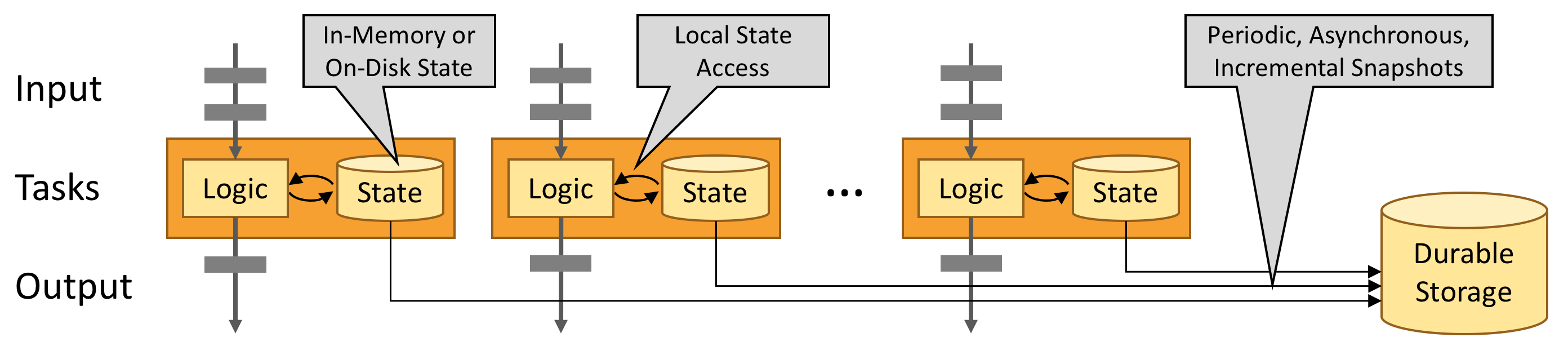
Flink Architecture
API Levels in Flink
Flink provides different levels of abstraction for developing streaming/batch processing applications.
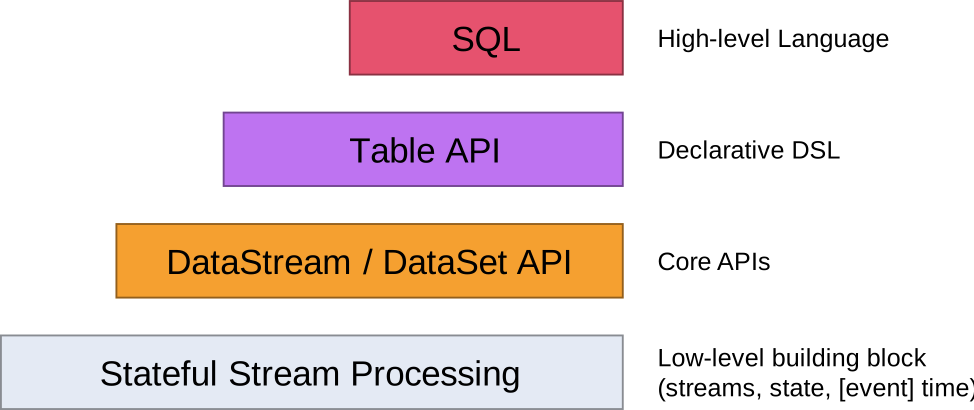
The lowest level abstraction in Flink API is stateful real-time stream processing. Its abstraction implementation is the Process Function, and Process Function is integrated into the DataStream API by the Flink framework for our use. It allows users to freely process events (data) from one or multiple streams in applications, providing state with global consistency and fault tolerance guarantees. Additionally, users can register event time and processing time callbacks at this abstraction level, allowing programs to implement complex computations.
The second level abstraction in Flink API is Core APIs. In practice, many applications don’t need the lowest level abstraction APIs mentioned above, but can be programmed using Core APIs: these include the DataStream API (for bounded/unbounded data stream scenarios) and DataSet API (for bounded dataset scenarios). Core APIs provide fluent APIs for data processing with common building blocks, such as various forms of user-defined transformations, joins, aggregations, windows, and state operations. Data types processed at this API level have corresponding classes in each programming language.
The mutual integration of Process Function at the lower level and DataStream API allows users to choose lower-level abstraction APIs to implement their requirements. DataSet API additionally provides primitives such as loop/iteration operations.
The third level abstraction in Flink API is Table API. Table API is a declarative programming (DSL) API centered on tables. For example, in streaming data scenarios, it can represent a dynamically changing table. Table API follows (and extends) the relational model: tables have schemas (like schemas in relational databases), and Table API provides similar operations to the relational model, such as select, project, join, group-by, and aggregate. Table API programs declaratively define what logical operations should be executed rather than precisely specifying what code the program should execute. Although Table API is very concise and can be extended with various types of user-defined functions, it is still less expressive than Core APIs. Additionally, Table API programs are optimized using optimizer rules before execution.
Tables and DataStream/DataSet can be seamlessly converted, allowing Flink users to mix Table API with DataStream/DataSet APIs when writing applications.
The top level abstraction in Flink API is SQL. This abstraction is similar to Table API in both semantics and program expressions, but programs are implemented as SQL query expressions. SQL abstraction is very closely related to Table API abstraction, and SQL query statements can execute on tables defined in Table API.
Stream Processing
In the natural environment, data generation is inherently streaming. Whether it’s event data from web servers, trading data from stock exchanges, or sensor data from factory floor machines, the data is streaming. But when you analyze data, you can organize data processing around two models: bounded or unbounded streams. Of course, choosing different models will result in different program execution and processing methods.
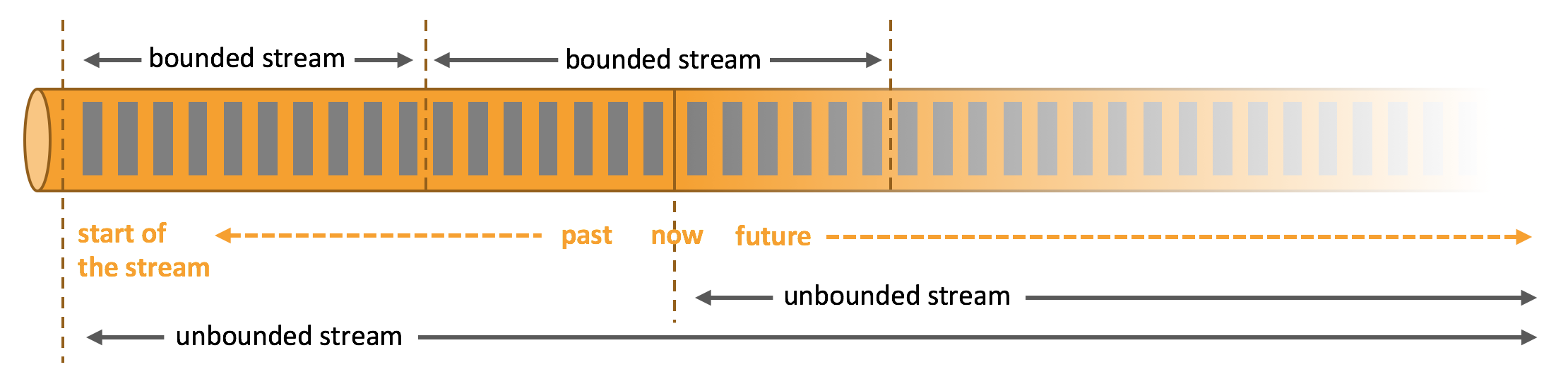
Batch processing is the paradigm for bounded data stream processing. In this mode, you can choose to input the entire dataset before computing and outputting results, which means you can sort, count, or aggregate all dataset data before outputting results.
Stream processing is the opposite, involving unbounded data streams. At least theoretically, its data input never ends, so the program must continuously process arriving data.
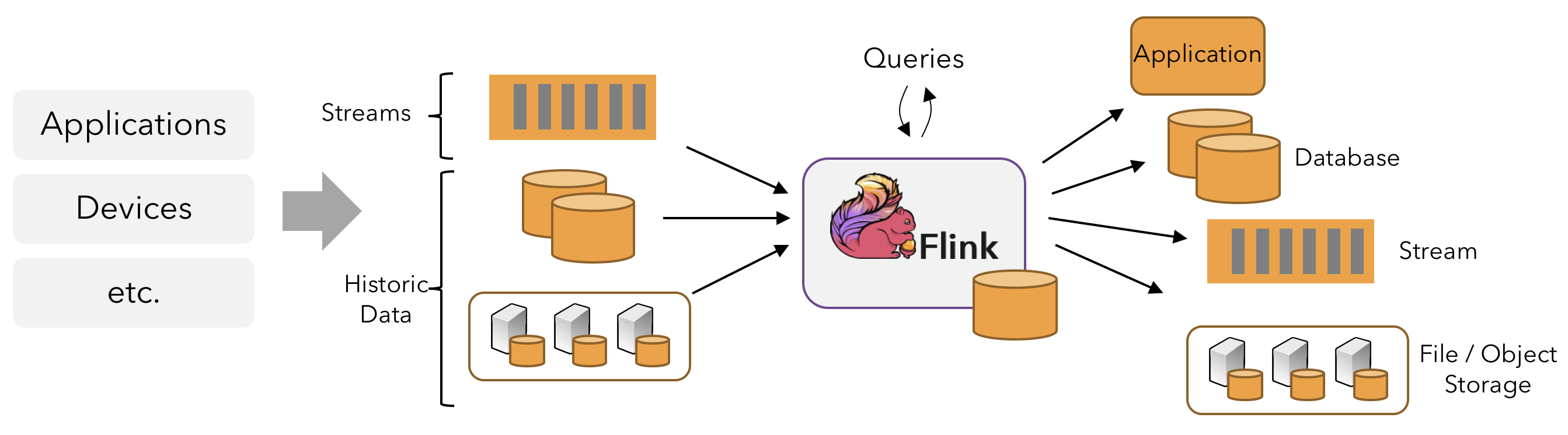
In Flink, applications consist of streaming dataflows transformed from user-defined operators. These streaming dataflows form a directed graph, starting with one or more sources and ending with one or more sinks.
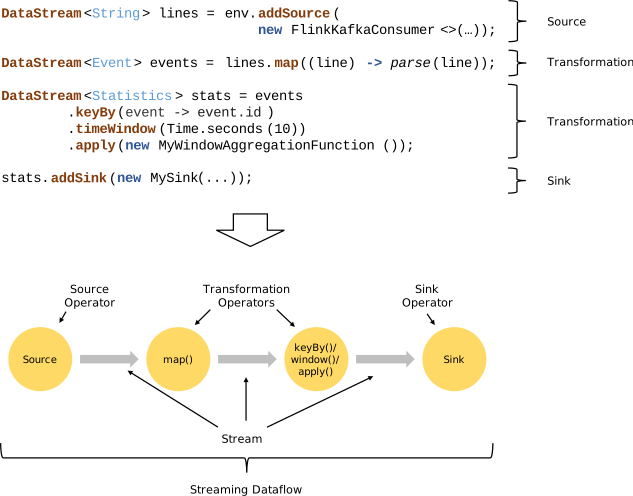
Flink applications can consume real-time data from streaming data sources such as message queues or distributed logs (e.g., Apache Kafka or Kinesis), and can also consume bounded historical data from various data sources. Similarly, result streams generated by Flink applications can be sent to various data sinks.
Flink programs are essentially distributed parallel programs. During program execution, a stream has one or more stream partitions, and each operator has one or more operator subtasks. Each subtask is independent and runs in different threads, or in different machines or containers.
The number of operator subtasks is the parallelism of the corresponding operator. Different operators in the same program may have different parallelisms.
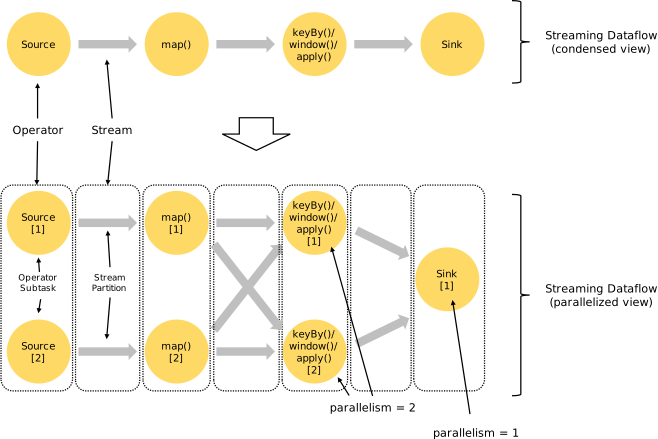
Flink operators can transfer data between each other in one-to-one (forwarding) mode or redistributing mode:
- One-to-one mode (e.g., between Source and map() operators in the above diagram) preserves the partitioning and ordering of elements. This means that subtask[1] of the map() operator receives data and its order exactly the same as the data and order output by subtask[1] of the Source operator - data from the same partition only enters the same partition of the downstream operator.
- Redistributing mode (e.g., between map() and keyBy/window, and between keyBy/window and Sink in the above diagram) changes the stream partitions containing the data. When you choose to use different transformations in your program, each operator subtask will send data to different target subtasks based on different transformations. For example, these transformations and their corresponding data distribution modes: keyBy() (repartitioning by hash key), broadcast() (broadcasting), or rebalance() (random redistribution). In the redistribution process, elements can only preserve ordering information between each pair of output and input subtasks (e.g., elements from subtask[1] of map() received by subtask[2] of keyBy/window are ordered). Therefore, the order in which aggregation results of different keys arrive at Sink is non-deterministic when data is redistributed between keyBy/window and Sink operators as shown in the diagram above.
A Flink cluster runtime consists of two types of processes: one JobManager and one or more TaskManagers.
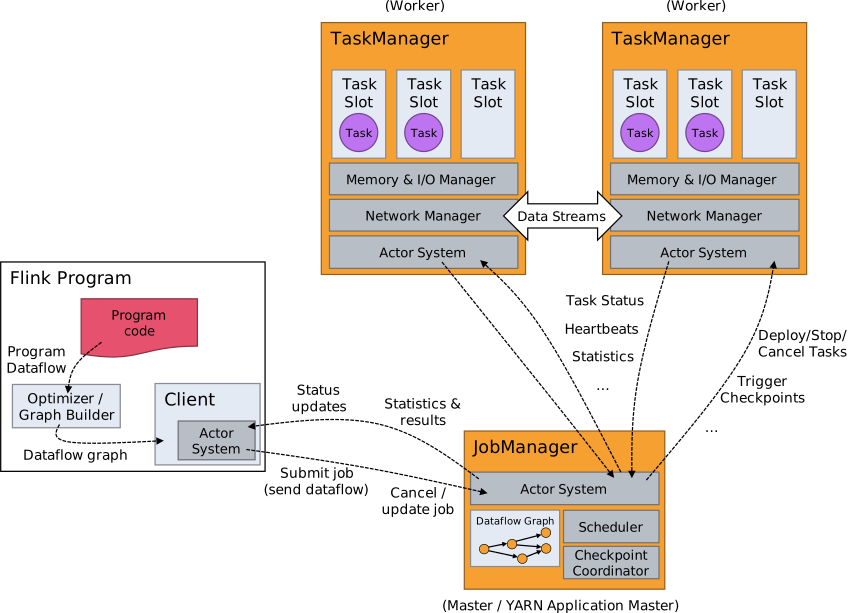
The Client is not part of the runtime and program execution, but is used to prepare the dataflow and send it to the JobManager. After that, the client can disconnect (detached mode) or remain connected to receive progress reports (attached mode). The client can run as part of the Java/Scala program that triggers execution, or run in a command-line process ./bin/flink run ....
JobManager and TaskManager can be started in various ways: directly as a standalone cluster on machines, in containers, or managed and started through resource frameworks like YARN. TaskManagers connect to JobManagers, announce their availability, and are assigned work.
JobManager
The JobManager has many responsibilities related to coordinating the distributed execution of Flink applications: it decides when to schedule the next task (or group of tasks), reacts to completed tasks or execution failures, coordinates checkpoints, and coordinates recovery from failures. This process consists of three distinct components:
ResourceManager
The ResourceManager is responsible for resource management in the Flink cluster. Flink implements corresponding ResourceManagers for different environments and resource providers (e.g., YARN, Mesos, Kubernetes, and standalone deployments).
In standalone deployment mode, the ResourceManager can only allocate slots of available TaskManagers and cannot start new TaskManagers on its own.
Dispatcher
The Dispatcher provides a REST interface for submitting Flink application executions and starts a new JobMaster for each submitted job. It also runs the Flink WebUI to provide job execution information.
JobMaster
The JobMaster is responsible for managing the execution of a single job. Multiple jobs can run simultaneously in a Flink cluster, each with its own JobMaster.
There is always at least one JobManager. In high availability (HA) setups, there may be multiple JobManagers, where one is always the leader and the others are standby.
TaskManager
TaskManager (also called worker) executes job tasks and caches and exchanges data streams.
There must always be at least one TaskManager. The smallest unit of resource scheduling in TaskManager is the task slot. The number of task slots in TaskManager indicates the number of concurrent task processing. Note that multiple operators can execute in one task slot.
Tasks and Operator Chains
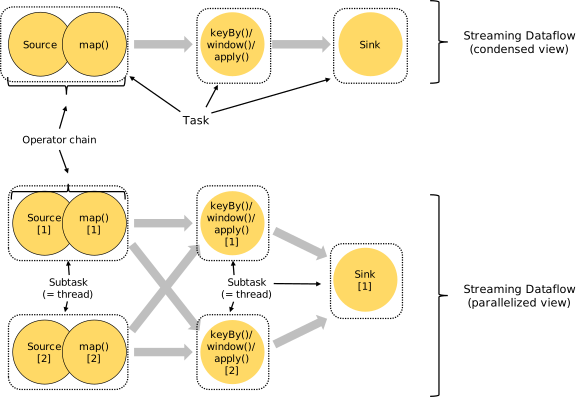
For distributed execution, Flink chains operator subtasks into tasks. Each task is executed by one thread. Chaining operators into tasks is a useful optimization: it reduces thread switching and buffering overhead, and increases overall throughput while reducing latency.
Task Slots and Resources
Each worker (TaskManager) is a JVM process that can execute one or more subtasks in separate threads. To control how many tasks a TaskManager accepts, there are so-called task slots (at least one).
Each task slot represents a fixed subset of resources in the TaskManager. For example, a TaskManager with 3 slots will dedicate 1/3 of its managed memory to each slot. Allocating resources means that subtasks won’t compete with subtasks from other jobs for managed memory, but have a certain amount of reserved managed memory. Note that there is no CPU isolation here; currently slots only separate task managed memory.
Tasks in the same JVM share TCP connections (via multiplexing) and heartbeat messages. They can also share datasets and data structures, reducing the overhead of each task.
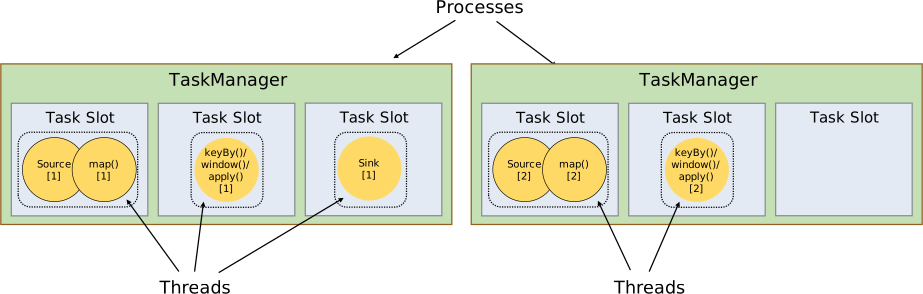
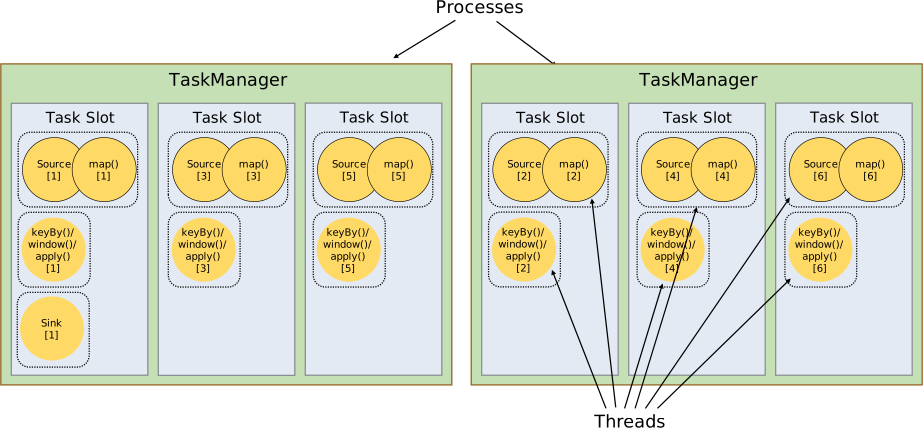
By default, Flink allows subtasks to share slots, even if they are subtasks of different tasks, as long as they are from the same job. The result is that one slot can hold an entire job pipeline. Allowing slot sharing has two main advantages:
- The number of task slots required by the Flink cluster is exactly the same as the maximum parallelism used in the job. No need to calculate how many tasks (with different parallelisms) the program contains in total.
- Easier to achieve better resource utilization. Without slot sharing, non-intensive subtasks (source/map()) would block as many resources as intensive subtasks (window). Through slot sharing, the basic parallelism in our example increases from 2 to 6, fully utilizing allocated resources while ensuring heavy subtasks are fairly distributed among TaskManagers.
Flink Application Execution Modes
Flink application jobs can be submitted to long-running Flink Session Clusters, dedicated Flink Job Clusters, or Flink Application Clusters. The differences between these options mainly relate to cluster lifecycle and resource isolation guarantees.
Flink Session Cluster
- Cluster Lifecycle: In a Flink Session Cluster, the client connects to a pre-existing, long-running cluster that can accept multiple job submissions. Even after all jobs complete, the cluster (and JobManager) will continue running until the session is manually stopped. Therefore, the lifetime of a Flink Session Cluster is not bound to the lifetime of any Flink job.
- Resource Isolation: TaskManager slots are allocated by the ResourceManager when jobs are submitted and released when jobs complete. Since all jobs share the same cluster, there is some competition for cluster resources - such as network bandwidth during job submission. A limitation of this shared setup is that if a TaskManager crashes, all jobs running tasks on this TaskManager will fail; similarly, if some fatal error occurs on the JobManager, it will affect all jobs running in the cluster.
- Other Considerations: Having a pre-existing cluster can save significant time requesting resources and starting TaskManagers. This is important in scenarios where job execution time is short and long startup time would negatively impact end-to-end user experience - like interactive analysis of short queries where jobs should quickly execute computations using existing resources.
Previously, Flink Session Clusters were also referred to as Flink clusters in session mode.
Flink Job Cluster
- Cluster Lifecycle: In a Flink Job Cluster, the available cluster manager (e.g., YARN) is used to start a cluster for each submitted job, and this cluster is only available for that job. Here, the client first requests resources from the cluster manager to start the JobManager, then submits the job to the Dispatcher running in this process. TaskManagers are then lazily allocated based on the job’s resource requests. Once the job completes, the Flink Job Cluster is torn down.
- Resource Isolation: A fatal error in the JobManager only affects one job running in the Flink Job Cluster.
- Other Considerations: Since the ResourceManager must apply and wait for external resource management components to start TaskManager processes and allocate resources, Flink Job Clusters are more suitable for long-running, large jobs with high stability requirements and that are not sensitive to longer startup times.
Previously, Flink Job Clusters were also referred to as Flink clusters in job (or per-job) mode.
Kubernetes does not support Flink Job Clusters. Please refer to Standalone Kubernetes and Native Kubernetes.
Flink Application Cluster
- Cluster Lifecycle: A Flink Application Cluster is a dedicated Flink cluster that executes jobs only from the Flink application, and the
main()method runs on the cluster rather than the client. Job submission is a single-step process: no need to first start a Flink cluster and then submit a job to an existing session cluster; instead, package application logic and dependencies into an executable job JAR, and the cluster entry point (ApplicationClusterEntryPoint) is responsible for calling themain()method to extract the JobGraph. For example, this allows you to deploy Flink applications just like deploying any other application on Kubernetes. Therefore, the lifetime of a Flink Application Cluster is related to the lifetime of the Flink application. - Resource Isolation: In a Flink Application Cluster, the ResourceManager and Dispatcher serve a single Flink application, providing better isolation compared to Flink Session Clusters.
Flink Job Clusters can be seen as a “client-run” alternative to Flink Application Clusters.
Checkpoint
Flink provides exactly-once characteristics, which depend on checkpoint mechanism + partially replayable data sources.
Partially replayable data sources: Flink selects the most recently completed checkpoint K, then the system replays the entire distributed data stream and gives each operator their state from checkpoint K snapshot. Data sources are set to re-read the stream starting from position Sk. For example, in Apache Kafka, this means telling the consumer to re-consume from offset Sk.
Checkpoint mechanism: Checkpoints are triggered periodically, generating persistent snapshots that record:
- The offset of messages in the data source (e.g., Kafka) when the current checkpoint starts.
- Current state information of all stateful operators (e.g., values in sum).
Checkpoint is the core functionality for Flink to implement fault tolerance mechanisms. It can periodically generate snapshots based on the state of each Operator/task in the Stream according to configuration, thereby regularly persisting these state data. When a Flink program unexpectedly crashes, you can optionally recover from these snapshots when rerunning the program, thereby correcting program data anomalies caused by failures.
One of the core concepts of snapshots is barriers. These barriers are injected into the data stream and flow downstream as part of the data stream along with records. Barriers never overtake records, and the data stream is strictly ordered. Barriers isolate records in the data stream into a series of record sets, adding some data from these sets to the current snapshot and other data to the next snapshot.
Each barrier carries the snapshot ID, and records before the barrier enter that snapshot. Barriers don’t interrupt stream processing and are very lightweight. Multiple barriers from different snapshots can appear in the stream simultaneously, meaning multiple snapshots can occur concurrently.
Single Stream Barriers
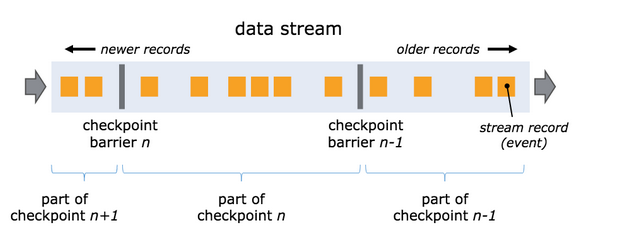
Barriers are injected into parallel data streams at data stream sources. The position where barriers for snapshot n are inserted (denoted as Sn) is the maximum position in the data source that the snapshot contains. For example, in Apache Kafka, this position would be the offset of the last record in a partition. This position Sn is reported to the checkpoint coordinator (Flink’s JobManager).
Barriers then flow downstream. When an intermediate operator receives barriers n from all its input streams, it emits barriers into all its output streams for snapshot n. Once a sink operator (the end of the streaming DAG) receives barriers n from all its input streams, it acknowledges snapshot n complete to the checkpoint coordinator. After all sinks acknowledge the snapshot, the snapshot is complete.
At this point, these records (and their subsequent records) will have already passed through the entire data stream topology, meaning they have been completely processed.
Multi-Stream Barriers
When receiving multiple input streams, barrier alignment is required to achieve ExactlyOnce. The process works as follows:
- Once an operator receives snapshot barrier n from one input stream, it stops processing any records from that stream and places them in an input buffer until it receives all barriers n from other inputs.
- After receiving barrier id=n from all input streams, the operator sends barrier id=n downstream and also snapshots its own state.
- When jobs experience backpressure, blocking barrier alignment can exacerbate job backpressure and even lead to job instability. Therefore, after Flink version 1.11, an Unaligned Checkpointing mechanism was introduced. The main functionality is that after the barrier arrives, there’s no need to wait for barriers from all input streams, but rather continue processing data. Then, all data after the first arriving barrier is also included in the checkpoint. In the next computation, previously saved data and incoming streaming data are merged before calculation. This greatly speeds up barrier flow and reduces overall checkpoint duration.
State Backend
Flink provides StateBackend to store and manage state data during the Checkpoint process. StateBackend comes in three types:
- MemoryStateBackend: State data is stored in Java heap memory. When executing checkpoint, state snapshot data is saved to jobmanager’s memory.
- FsStateBackend: State data is stored in taskmanager’s memory. When executing checkpoint, state snapshot data is saved to the configured file system, which can use distributed file systems like HDFS.
- RocksDBStateBackend: RocksDB is slightly different from the above. It maintains state in the local file system, and state is written directly to local RocksDB. Meanwhile, RocksDB needs to configure a remote filesystem. RocksDB overcomes the limitation of state being restricted by memory while being able to persist to remote file systems, making it more suitable for production use.